Showing posts with label education. Show all posts
Showing posts with label education. Show all posts
Wednesday, February 2, 2011
Recycling, Recycling Everywhere
Wow! Where to begin, let’s see, we know everyone is going ‘green’ today and that, for the most part, is a good thing. However, Kermit had it right years ago when he stated, “It's not easy bein' green (Mander, 2011).” As of January first, the state of Indiana and approximately twenty-seven other states have banned the disposal of electronics in the trash (AP, 2011). These laws have been put into place to encourage recycling of all electronic material (Indiana, 2010). Well, how many of you heard about this on the mainstream news? Is that silence I hear or were you shaking your head no? You are not the only one. Many of my coworkers and the general public that I surveyed did not even know that the law had gone into effect. The only agencies that have been reporting on it or giving it any kind of press have been the local newspapers. So if your New Year resolution was to clean out that closet or organize the family room has not come to pass, it may have been a good thing.
Why is this new law being imposed? For the state of Indiana, it all began back in July 2009 when legislature enacted Indiana Electronic Waste Program (IC 13-20.5) and the second phase was completed January 1, 2011 (Indiana, 2010). It appears our electronics have some fairly deadly chemicals (lead, mercury, cadmium, and hexavalent chromium) in them and when they are thrown into the landfill they can leach into our water supply. I personally don’t want a little mercury to drink with my dinner tonight. Do you? In addition, there is a shortage of some of the metals contained within our electronics, specifically copper, so any and all that we can retain for reuse will help keep the costs down on these metals and ultimately keep the costs down on our electronics (Carpenter, 2010).
eCycle - this is the new term being used for proper disposal of all electronic equipment in the state of Indiana (Indianapolis, 2011). Kind of catchy and fun.
According to the EPA, our household consumption and disposal of Municipal Solid Waste (MSW) has escalated since 1985 (EPA, 2010). In 1985, which was around the same time personal computers were beginning to enter the everyday household, we were only recycling 10.1% of our MSW (EPA, 2010). Fortunately as the years have passed, we have become educated on what of our waste does to the environment and we have learned to recycle more with each year that passes. In 2009, we recycled 33.8% of our MSW (EPA, 2010).
In the Electronic Waste Program Overview, it states in reference to Indiana Households, Public Schools and Small Businesses that the “beginning in 2011, Indiana covered entities are prohibited from disposing of e-waste in with their standard trash collection” (IDEM, 2010). Currently, in the state of Indiana, there is not a fine or a penalty for not recycling your electronics, however many believe that it will eventually come (Lewis, 2010).
So what is an educator to do, you ask? First, let me preface this by saying, I have never considered myself a tree hugger or an eco-freak, but I do suggest we begin by educating your students about the law and begin the discussion there. I took a moment this past week to do just that in my classroom and I received many different responses from shocked to outright cries of idiocy. Yet, no matter what the response may be, we must begin to educate them on their responsibilities as citizens, as consumers, as caretakers of the earth’s resources and as, in my case, young adults. We must help them to understand we need to begin now, begin small and begin with each home doing their part by recycling their electronics properly.
So just like Kermit, it isn't easy being green, but I'm working on it and I'm inviting you to do the same. Below is more information for further exploration on your own, but by no mean is it exhaustive. Hi-Ho!
Agencies:
Indiana Recycling
Indiana Government
Institute of Scrap Recycling Industries, Inc.
Keep Indianapolis Beautiful, Inc.
Sustain Indy
Possible Disposal Sites for eCycling:
Central Indiana
South Belmont Collection Facility
2700 South Belmont
Tuesdays and Thursdays, 9am-11am
IMPD Training Facility (located near Superior Court 13)
9049 East 10th Street
1st and 3rd Saturday of each month, 9am-2pm
Perry Township Government Center
4925 South Shelby Street
2nd and 4th Saturday of each month, 9am-2pm
Trader's Point Collection Facility
7550 North Lafayette Road
1st and 3rd Saturday of each month, 9am-2pm
Southern Indiana
Recycle Johnson County
C&I Electronics
1700 N. Lafayette Avenue
Evansville, Indiana, 47711
Office: 812-423-9166
Toll Free: 800-547-6188
For an extensive in depth listing of recycling and eCycling sites visit IndyStar.com
References for this Blog Post:
Associated Press (2011, January 5). New laws boost electronics recycling: in 27 states, do not call your old computer ‘trash’. Retrieved February 1, 2011 from http://record-eagle.com/business/x126037448/New-laws-boost-electronics-recycling
Carpenter, Claudia (2010, December 7). Bloomberg: Copper faces two-year shortage, will peak over $10,000, Trafigura says. Retrieved February 1, 2010 from http://www.bloomberg.com/news/2010-12-07/copper-faces-2-year-shortage-peak-over-10-000-trafigura-says.html
City of Indianapolis (2011). Sustain Indy: eCycle. Retrieved February 1, 2011 from http://www.sustainindy.org/ecycle.cfm
EPA - United States Environmental Protection Agency (2010, December). Municipal solid waste generation, recycling and disposal in the United States: Facts and figures 2009. Retrieved February 1, 2011 from
http://www.epa.gov/epawaste/nonhaz/municipal/pubs/msw2009-fs.pdf
IDEM - Indiana Department of Environmental Management (2010, December 8). Electronic waste program overview: Fact sheet. Retrieved February 1, 2011 from
http://www.in.gov/recycle/files/factsheet_electronic_waste_program_overview.pdf
Indiana General Assembly (2010). Table of contents: 2010 Enrolled acts. Retrieved February 1, 2011 from
http://www.in.gov/legislative/ic/code/title13/ar20.5/
IndyStar (2010, December 10). Where to recycle in Central Indiana. Retrieved February 1, 2010 from http://www.indystar.com/article/99999999/LIVING08/101210033/Where-recycle-Central-Indiana
Lewis, Brandon (2010, December 29). Gray Television, Inc.: New law bans electronics from trash. Retrieved February 1, 2010 from http://www.wndu.com/home/headlines/New_IN_law_to_ban_electronics_from_regular_trash_112601824.html
Mander, Keith (2011, February 1). It isn’t easy being green: Song lyrics & words. Retrieved February 1, 2011, from http://bussongs.com/songs/it_isnt_easy_being_green.php

Saturday, October 24, 2009
BP14_20091024_Response_To_Peer_Blog_Post
Sunday, October 18, 2009
BP15_2009103_The Incredible Art Department
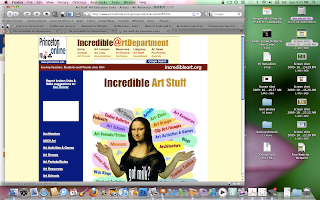
With a name like this, one does not know what to expect. I thought of the Hulk, (lol) but have come to use this resource for many things. Princeton University continues to update and enlarge this site that I have used for years. My favorite aspect of the site is that is is kept updated and always has new things. It has become my go-to place for the latest art gadgets. Like the Getty, it is well-funded and thus reliable.
The screen shot makes it clear just how many different aspects of teaching art are facilitated by this site, since each word surrounding Mona Lisa is a link. From blogs to suppliers; from lessons to games and activities; from links to association resources for advocacy, this site has it all. When I am in need of some lesson resources, it is always my first stop, and often the only one. For inspiration or even for sub plans, this is site is the best one I know. Check it out for yourself.
The screen shot makes it clear just how many different aspects of teaching art are facilitated by this site, since each word surrounding Mona Lisa is a link. From blogs to suppliers; from lessons to games and activities; from links to association resources for advocacy, this site has it all. When I am in need of some lesson resources, it is always my first stop, and often the only one. For inspiration or even for sub plans, this is site is the best one I know. Check it out for yourself.

3 comments:
- beckie lamborn said...

-
The Incredible Art Department, look at all the activities Mona Lisa is juggling!! I will have to check this site out!
- October 18, 2009 1:55 PM

- cmtobias55 said...

-
I checked this site out and it is filled with lessons for every age group.
Just about everything and any thing anyone wants to know about art can be found on that sits. It is a wonderful resource. - October 18, 2009 9:30 PM
- Danni Brayer said...

-
I have been to this site before, but some time ago. At that time, I was unimpressed with it; it was clunky to get around on and not well organized. However, I took the time to peruse it once again. I found a new navigation along with a new arrangement of information. I was excited to find the addition of a variety of videos available for viewing and an improved arrangement of artist lists. Thank you for bring this site back to my attention and recommending that I visit it once again. I now have another online resource for my art classes.
- October 24, 2009 5:54 PM


BP13_200910124_Web_2.0_Applications_6

During my class at Full Sail University, I have viewed several slide shows that have been uploaded to SlideShare (http://www.slideshare.net/ ) by professionals for communication and review. Prior to being exposed to SlideShare I did not know such a ‘venue’ existed.
With the classes that I teach, I have struggled with posting some of my lectures created in Microsoft PowerPoint due to file size. My largest file size was 64 MB, yet our school’s online class management software could never handle that size of an image heavy slide presentation. SlideShare will let a user upload 100MB per file in various file formats. Because of the issue with our online class management software, I had to start limiting the imagery in my PowerPoints and I had to limit the amount of slides I could cover in a day’s time or it became to confusing for students to know what PowerPoint to review for homework at night. However, with SlideShare I will be able to upload my PowerPoints to it, get the link and attach that link to the school’s online class management page. No more five and six PowerPoint per unit in my classroom. I can upload it all at once and it will be done.
The added benefit I have discovered with SlideShare is that it has other professionals adding to it daily. It has this plethora of information available at the fingertips of my students for continued learning and further exploration.
Finally, I did a team presentation a few weeks ago with a fellow art teacher. If I had taken the time to explore SlideShare further prior to it, I could have placed the completed Keynote presentation on it for all attendees to access upon returning to their school, but instead I made a PDF and placed a link to it on a web site. I now know more Web 2.0 tools to utilizes and tools which I can refer colleagues.
BP12_200910124_Web_2.0_Applications_5

I fell in love last night…with Moshi Monsters ( http://www.moshimonsters.com/ )! It is the cutest virtual world I have ever visited. It allows the player to pick one of six monsters to interact with in the Moshi world. To personalize the monster, the user gets to change the main color and add one accent color. Next, Moshi has a set of user rules everyone must agree to use the virtual world (see image below). The next screen has a Monstro City Adoption Paper, which includes your user name, password, age and email typed in twice. Moshi sends a confirmation email and you must wait for it before you can ‘enter’ the world. The next window that pops-up congratulates you and tell you to check your email. This email also tells you your owner name along with what kind of free stuff you will receive when you enter the world to help get you started. When you receive the Moshi email, you click on the link provided and the link takes you to the ‘monster’ world. Once there, a dialogue box pops-up and asks you to name your monster. Once the monster is named; it receives a house, food and Rox (money that looks like gems in Moshi world). You and your monster can explore a limited area for free, earn Rox by playing educational games and communicate with other ‘monsters.’
Moshi’s makes this statement on its Parent’s page, “We want to reassure you that the three core elements at the very heart of the Moshi Monsters experience are FUN, EDUCATION and SAFETY.” However, the finally selling point for me as a parent and an educator is the ‘thought’ behind it. When you look at the Parent’s page it is very reassuring on various levels, limited social networking, educational games, tracking compliance of rules, etc., but when I played the games…I had to think for myself…they were not boring or slow paced. The games are challenging and keep you on your toes. The games on Moshi are games like I watch high school students gravitate to naturally, if they see someone else playing it and they want to try it out for themselves.
As for use in the classroom, this is the best environment I’ve seen to introduce students, safely, to the virtual world. I’ve seen the Club Penguin (Moshi Monsters can be upgraded for about the same price) and I’ve seen Build-A-Bear.com, I feel this one is the best of them all. I don’t think Moshi is limited to elementary students. I feel a lot of high school level students could benefit from being exposed to it as well. Plus Facebook even has Super Poke Pet and I find adults are playing it. I showed Moshi Monsters to my daughter, who is a senior in high school, and she can’t wait to make an account for herself. Check it out; I think you and your students will fall in love too!

Friday, October 23, 2009
BP11_200910123_Web_2.0_Applications_4

First, Woopid is ‘searchable’ for quick access to the tutorial information. Second, it also lists the available tutorials in a library, which can be viewed by subject, title or vendor. The thing I found unique about Woopid’s library is that it includes Hardware, Internet, MAC, Ubuntu (which I have no idea what it is) and Windows not just software.

Third, they ‘bundle’ the video tutorial together in a logical order that allow the viewer to go forward or backward as needed in they’re learning process. I feel this is a good way for a student to learn and to be in control of their pace. Finally, if the Woopid site doesn’t have what you are looking for, you can request a personal tutorial for a feel of $3.99. Personally, this is a very small fee for a personalized video tutorial.
I highly recommend this Web 2.0 tool. It is a great resource to share with colleagues and parents. I believe it will help students while they are taking my class and, hopefully, will remain a great resource for them long after they have finish my class.
Sunday, October 18, 2009
BP10_20091018_Flickr

I teach Computer Basics at my school. Last year I began incorporating a unit on digital media. It included taking photos, scanning photos, taking digital photos, placing photos in iPhoto, including photos in an iMovie and ending with a movie about themself to share with the class. Well this year I believe I will add to the ‘mix’ creating a Flickr account and uploading pictures to be used in a storyboard before they create their movie about themselves.
As I researched Flickr, I did find some inappropriate guidance being given by teachers concerning images and I would like to correct it here. In the article, Using flickr.com in the Classroom by Pamela AuCoin, she encourages students to search for images using Google images and then to add those images to Flickr (2009). By encouraging students to complete this task, they are inadvertently violating copyright laws and should not be taught that this is appropriate to do when they are in need of images. In addition, Google images should not be downloaded to any computer; they frequently contain viruses that will download along with the image. This would open up the students to viruses on their personally computer and open up the school to attach too. However, Derek Baird suggested students to use the Creative Commons aspect of Flickr only and to use it to replace cutting up old magazines for project (2009). I felt this was a wonderful idea for projects. Using Flickr would result in less mess and in time spent looking for images, thanks to tagging.
The best web site or blog that I came across in my research was on TheRoxor by Kevin, he gave no last name. His blog was called A Simple Guide To Flickr. He was pretty through in his explanation and added links. It is definitely worth your time to check this blog out. Through his instruction, I was able to upload the photo on this blog post using Flickr. I hope you learn as much from him as I did, see the last link below. Enjoy!
References
AuCoin, P. (2009, October 18). Using flicker.com in the classroom. Teachers Network. Retrieved from http://www.teachersnetwork.org/NTNY/nychelp/technology/flickr.htm
Baird, D. (2009, October 18). Teaching with technology: Flickr in the K-12 classroom. Learnhub. Retrieved from http://twt.learnhub.com/lesson/1517-flickr-in-the-k-12-classroom
Kevin (2009, June 9). A simple guide to flickr. Theroxor: Because design rocks. Retrieved from http://twt.learnhub.com/lesson/1517-flickr-in-the-k-12-classroom
Subscribe to:
Posts (Atom)